
This week was packed with big news: new inflation numbers, fresh U.S.–Iran tension, the SpaceX IPO, and the start of the 2026 FIFA World Cup.
When the market jumps, a flood of opinions appears from TV, headlines, and social media. It can feel as confusing as trying to learn the off‑side rule in soccer.
All that chatter can raise your anxiety. You might panic and make quick, bad investment choices.
The trick is to stop watching every headline and look at the bigger picture.
John Murphy’s first law of technical trading says the best place to start is a monthly or weekly chart. That’s why I keep a 20‑year monthly chart and a five‑year weekly chart ready to use.
Setting up StyleButtons lets you pull up any chart instantly with your favorite indicators already added. It saves a lot of time and lets you focus on analysis.
Here’s a short guide to create StyleButtons in SharpCharts so you can see long‑term, medium‑term, and short‑term charts with one click.
1. Open the Settings tab and click ChartStyle Library. 2. Browse the available styles with the Select Library dropdown. 3. Build your own style using the overlays and indicators you trust most. 4. Click Save ChartStyle to store it. 5. Press the + button, choose a label, position, and color, then attach your saved style to a new StyleButton.
Below is the 20‑year monthly chart I use to check the long‑term trend.
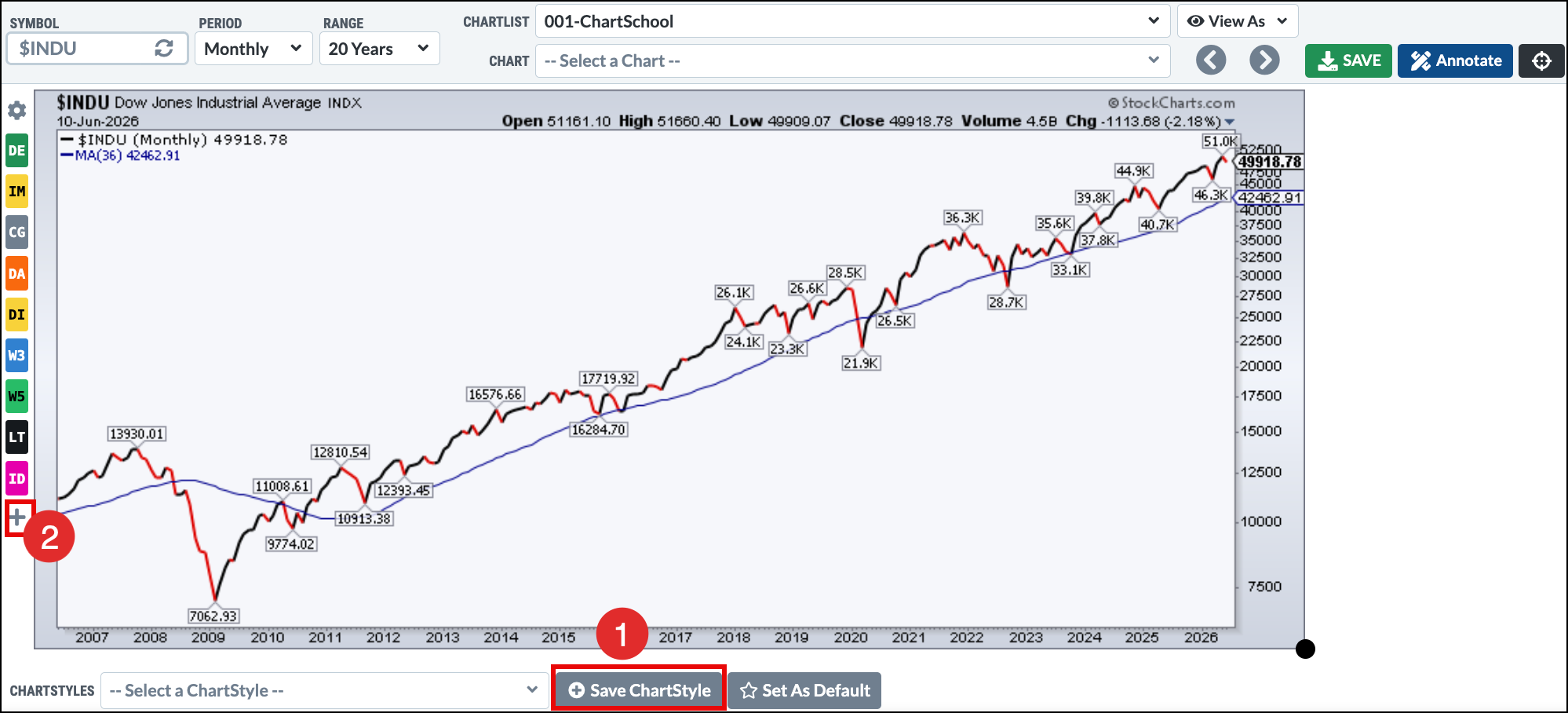
After you finish a chart, follow these steps to make a button:
- Click the Save ChartStyle button beneath the chart.
- Press the + icon, set the button’s position, label, and colour, then pick the ChartStyle you just saved.
Repeat the same process for weekly, daily, and intraday timeframes. Soon you’ll be able to flip between any chart period for any ticker in seconds.
In short, ignore the noisy news cycle and watch the price action. StyleButtons give you the information you need right on the screen, making investing calmer and more straightforward.
Enjoy a relaxed weekend!
Source: Materials provided by https://articles.stockcharts.com.Note: Content may be edited for style and length.